


WiFi Map: Free Wi-Fi Near You
4.318.29K Reviews
App Specs
- Version
- 8.6.67
- Updated On
- License
- Free
- Downloads
- 100,000,000+
- Developer
- WiFi Map LLC
- Categories
- Travel & Local
- Platform
- Android, iOS
Screenshots



 Analysis by AppCompare
When I’m away from home and need to check a route, send a message, or look up a bus time, a nearby connection can be more useful than another travel tip. WiFi Map: Free Wi-Fi Near You is built for that practical moment: it helps me look for public hotspots and makes finding a possible connection less of a guessing game. I see it as a travel companion, not a promise that every network will be fast, open, or ready when I arrive.
What to expect from the connection
The app is a free travel and local utility from WiFi Map LLC. Its scale is notable: it has more than 100 million installs and an average rating of 4.3 from around 3 million ratings. Those figures suggest a widely used service, but they are not a guarantee that the hotspot closest to me will work. The useful question is always local: whether a listing is current and whether its signal reaches the place where I need to sit or stand.
WiFi Map is a finder, rather than a way to make a weak public network faster. I use the map to identify a candidate, then treat the connection itself as something to test before relying on it. A hotspot that is fine for a quick message may struggle with a video call or a large file, and the name of a network alone cannot tell me which experience I’ll get.
Guides and Analysis on WiFi Map: Free Wi-Fi Near You
Finding a workable hotspot
Ever been out and about, desperately looking for a Wi-Fi connection so you can check your emails or upload that Instagram story? Yeah, me too. That’s where WiFi Map comes in. I've been using this app for a while now, and it's become my trusty sidekick whenever I'm on the move.
Discovering Nearby Wi-Fi
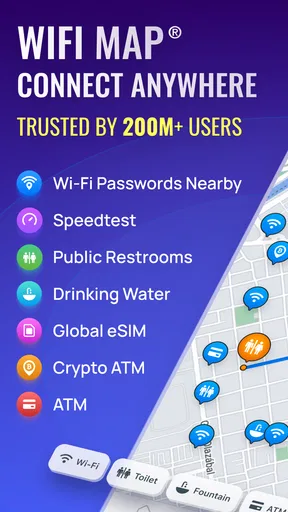
So, what’s the deal with this app? Essentially, it’s a crowd-sourced database of Wi-Fi hotspots around the world. The moment you open the app, it scans your location and presents you with a list of available networks nearby. It’s like having a personal Wi-Fi detective in your pocket.
The really cool part? Many of these networks come with passwords shared by other users. You don’t have to be that awkward person asking for the Wi-Fi password at a café anymore. Just check the app, and you’re in.
Simple Interface
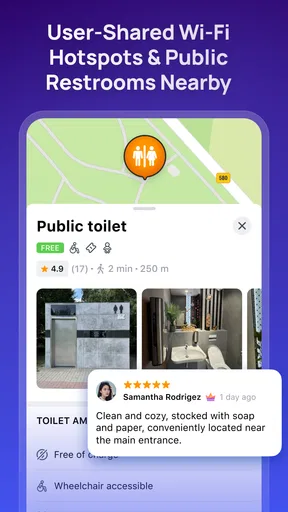
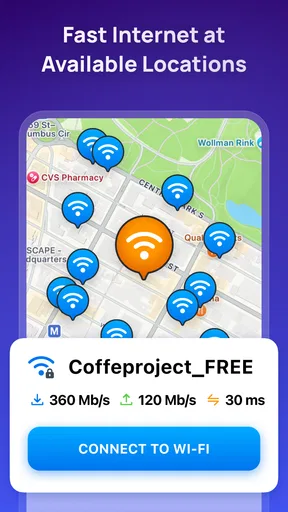
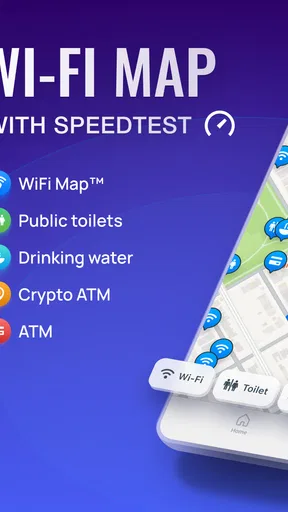
The interface is as straightforward as it gets. You’ve got your map with little blue dots representing the hotspots. Tap on a dot, and you’ll get details about the network, including the name and password, if available. The app even tells you the distance to each spot, so you can decide if it’s worth the trek.
Worth Reading Before You Choose

Basketball Stars: Multiplayer Is Fast, but Can It Recover When Matches Go Wrong?

WEBTOON Turns Phone Updates Into a Better Reading Routine

Link to Windows Runs on Shared Habits, Not Social Feeds

How Alibaba.com Dominates the B2B Marketplace

Metro's Quiet Rise: Redefining Mobile Communication

Harnessing Ecosystem Power with Phone Tracker by Number
There’s also a search feature. Say you’re planning a trip to Paris and want to scope out potential Wi-Fi spots ahead of time. Just type in the city, and voilà, instant access to all the Wi-Fi data you could need.
Plan before the signal disappears
My most useful workflow is to search while I still have a reliable connection, rather than waiting until I’m already stuck offline. I can look around my destination, compare nearby pins, and save an offline map before leaving. That turns the app into a small piece of trip preparation instead of an emergency tool that I’m trying to open after my data has already dropped.
Offline access is especially helpful for navigation between possible hotspots, but it does not make a network available where none exists. I still need to reach a listed location, and the saved map cannot tell me in advance whether a password remains valid or whether a venue is open. I treat offline information as a shortlist, not a guarantee.
Offline Mode
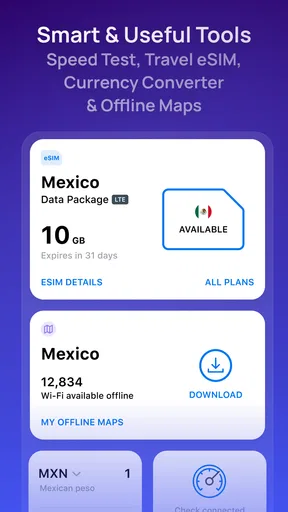
Now, what if you find yourself in a place with zero internet connection? No worries. The app has an offline mode. You can download the Wi-Fi maps for entire cities or countries before heading out, which is a lifesaver if you’re traveling abroad.
This feature is a game-changer, especially when roaming charges are through the roof, or when you’re in a remote area. You don’t need to be connected to the internet to find the nearest Wi-Fi. Talk about being prepared for anything!
When a trip gets complicated
Picture arriving in an unfamiliar city, with a hotel check-in message or a transit change to confirm, while your mobile connection is unreliable. I’d use the offline map to find a plausible nearby café or public venue, then check the listing details and walk there rather than wandering block by block. If the first network is unavailable, having looked at alternatives beforehand gives me a second option without needing to start the search from scratch.
That approach works best when I have flexibility about where to stop. If I need guaranteed connectivity for a meeting, a deadline, or navigation in an unfamiliar area, I would not make a community hotspot my only plan. I’d keep mobile data available if possible, or arrange dependable access where I’m staying. The app helps me find opportunities; it cannot control the venue, its router, or the crowd sharing the connection.
A community map has trade-offs
One of the aspects I love about WiFi Map is its community-driven nature. Users are encouraged to add new hotspots and update existing ones. If you find a new café with killer Wi-Fi, you can add it to the map for others to benefit from.
Plus, there's a little sense of satisfaction knowing you're contributing to a global network of connectivity. It’s like geocaching, but for Wi-Fi.
The community model is also the main reason I keep a little skepticism. A listing may be old, a password may have changed, or the signal may only be usable from a particular part of a building. Before walking far for a single pin, I check whether there are alternatives nearby. If I do try a network and the information is wrong, reporting or refreshing the listing is more useful than assuming the whole map is inaccurate.
Busy moments and connection checks
In a crowded station, airport, or café, finding a hotspot is only the first step. Many people may be using the same public connection, so a network that loads a simple page can still feel sluggish when I try something heavier. I use the app’s speed test as a quick check before committing to a task, but I don’t treat one result as a promise that the connection will stay steady throughout a call or download.
For a light task, I’ll try the connection and see whether the page or message completes. For a large upload or a video call, I’d look for a more dependable option and avoid starting the job just because a hotspot appears on the map. This is a useful distinction: the app can shorten the search for access, while the network’s real-world performance remains outside its control.
Additional Features
Beyond finding Wi-Fi, the app offers other features like a speed test, VPN services, and an integrated browser for secure surfing. The VPN is particularly handy if you’re accessing sensitive information over public networks.
The speed test lets you check the quality of the connection before you commit to downloading that next Netflix episode. It’s all about making sure you’re not caught with a buffering video at the worst moment.
I’d still be careful with sensitive accounts on any shared network and would not assume that a tool inside an app removes every risk of public browsing. The VPN and browser are additional options, not a reason to ignore basic caution. I also wouldn’t install the app solely for those extras if my main need were a dedicated privacy tool; its strongest fit is the combination of hotspot discovery and travel planning.
Who will get the most from it
I’d recommend it to travelers who want backup internet, people moving around a city, and anyone who regularly needs a connection for quick practical tasks. It can also help someone planning a route by letting them scout possible places to pause before they leave. The free price makes it easy to try, though in-app purchases range from $1.49 to $37.99 per item, so I’d check the purchase details before paying for anything.
It is less compelling if I already have reliable mobile data everywhere I go, or if I need a guaranteed high-speed connection for work. A person who mainly wants an offline navigation tool may prefer a dedicated maps app, while someone seeking a place to work for hours should check the venue itself rather than relying on a hotspot pin. WiFi Map is at its best as a flexible finder, not as a substitute for every travel or connectivity service.
Device fit and everyday friction
The current version is 8.6.31, and the minimum operating-system requirement is version 9. Its content rating is Everyone, so it is aimed at a broad audience. As with any map-based app, the experience depends partly on having a usable device and access to location information; if the map cannot place me accurately, searching by destination is a practical fallback.
During a trip, I would download only the offline area I expect to need rather than trying to prepare for every possible detour. That keeps planning focused and makes it easier to find the relevant map when I’m in a hurry. The app’s added services can also make it feel busier than a simple map, so I’d concentrate on the hotspot details first and explore extras only when they solve a real need.
It’s Not All Perfect
No app is without its quirks. Sometimes, the information can be outdated, depending on how active users are in your area. Also, while the app is free, there are in-app purchases and ads which can be a bit distracting at times.
But hey, considering the value it provides, I’d say it’s a minor inconvenience. And if it really bugs you, there’s always the option to upgrade to the premium version for an ad-free experience.
Is it worth keeping installed?
For me, the decision comes down to how often I’m somewhere unfamiliar and how costly it would be to lose access for a while. If I travel or move around town often, having a map of possible connections ready offline is worthwhile even when I don’t need it every day. If I rarely leave a dependable home or work network, it may add little beyond an occasional search.
WiFi Map was released on July 25, 2014, and its long presence in the travel-and-local space is reflected in its broad audience, but I still judge it by the usefulness of the results in the place I’m visiting. Around 18,000 written reviews sit alongside its much larger pool of ratings; neither community size removes the need to check a hotspot before depending on it. I see that scale as a reason to try the map, not a guarantee that every city has equally fresh information.
Wrapping It Up
In a world where being connected is almost a necessity, WiFi Map: Free Wi-Fi Near You is a fantastic tool to have. Whether you’re a digital nomad, a frequent traveler, or just someone who hates being disconnected, this app has got your back.
It’s intuitive, reliable, and thanks to the community involvement, it’s constantly improving. So next time you’re out and about, give it a shot. You might just find the perfect spot to sit, sip your coffee, and browse to your heart’s content.
My bottom line is that I’d keep it as a backup rather than depend on it as my sole route to the internet. Its strongest value is practical preparation: search before you set out, save the area you need, compare nearby options, and verify the connection before starting something important. Used that way, it can make a frustrating moment easier without pretending that every public hotspot will be fast, stable, or available.
Pros
- Extensive database of free Wi-Fi spots.
- User-friendly interface and easy navigation.
- Offline maps available for travel convenience.
- Community-driven updates ensure accuracy.
- Secure connection with VPN integration.
Cons
- Requires ads to support free version.
- Some locations may have outdated info.
- Offline maps need space on your device.
- VPN feature not available in free tier.
- Occasional connectivity issues reported.
FAQs for WiFi Map: Free Wi-Fi Near You
What is WiFi Map: Free Wi-Fi Near You?
WiFi Map: Free Wi-Fi Near You is a mobile application designed to help users find free Wi-Fi hotspots around the world. It provides a database of over 100 million hotspots, allowing users to connect to the internet easily and conveniently, especially when traveling or in areas with limited data coverage.
How does WiFi Map ensure the accuracy of hotspot information?
WiFi Map relies on community contributions to maintain its database of hotspots. Users can add new Wi-Fi locations, update existing ones, and share passwords. This collaborative approach helps ensure that the information remains current and reliable, although there may still be occasional inaccuracies.
Is WiFi Map safe to use?
WiFi Map is generally safe to use, but users should exercise caution when connecting to public Wi-Fi networks, as they can be vulnerable to security threats. The app itself does not provide security features, so it's advisable to use a VPN and ensure that your device's security settings are up-to-date while using public Wi-Fi.
Does WiFi Map work offline?
Yes, WiFi Map offers offline functionality. Users can download maps and hotspot data for specific areas ahead of time. This feature is particularly useful for travelers who may not have immediate access to mobile data or a reliable internet connection when they arrive at their destination.
Are there any costs associated with using WiFi Map?
WiFi Map is free to download and use, but it does offer in-app purchases and a premium version. The premium version provides additional features such as an ad-free experience, faster hotspot updates, and the ability to download larger areas for offline use. Users can choose based on their needs and preferences.


